On OcNOS, tcpdump is supported on DNX (Qumran) based platforms.
tcpdump can be used directly on Layer 3 interfaces. However, on switchports, a sniff interface must be configured first in order to capture traffic.
1. tcpdump on a Layer 3 interface
Access the Linux shell from privileged mode:
start-shell
Then switch to root:
su –
(Default password is typically root, depending on the deployment.)
Once in the Linux shell, you can run:
tcpdump -i <interface-name>
Example:
tcpdump -i xe10
2. Packet capture on a switchport (using sniff interface)
For switchports, you must configure a sniff interface from the OcNOS CLI. This allows capturing ingress and/or egress traffic and forwarding it to a virtual sniff interface (sniff0 or sniff1).
sniff (rx | tx | both) (<0-60>) (sniff1)
<0–60> – Capture duration in minutes
- Default: 1 minute
0= indefinite capture
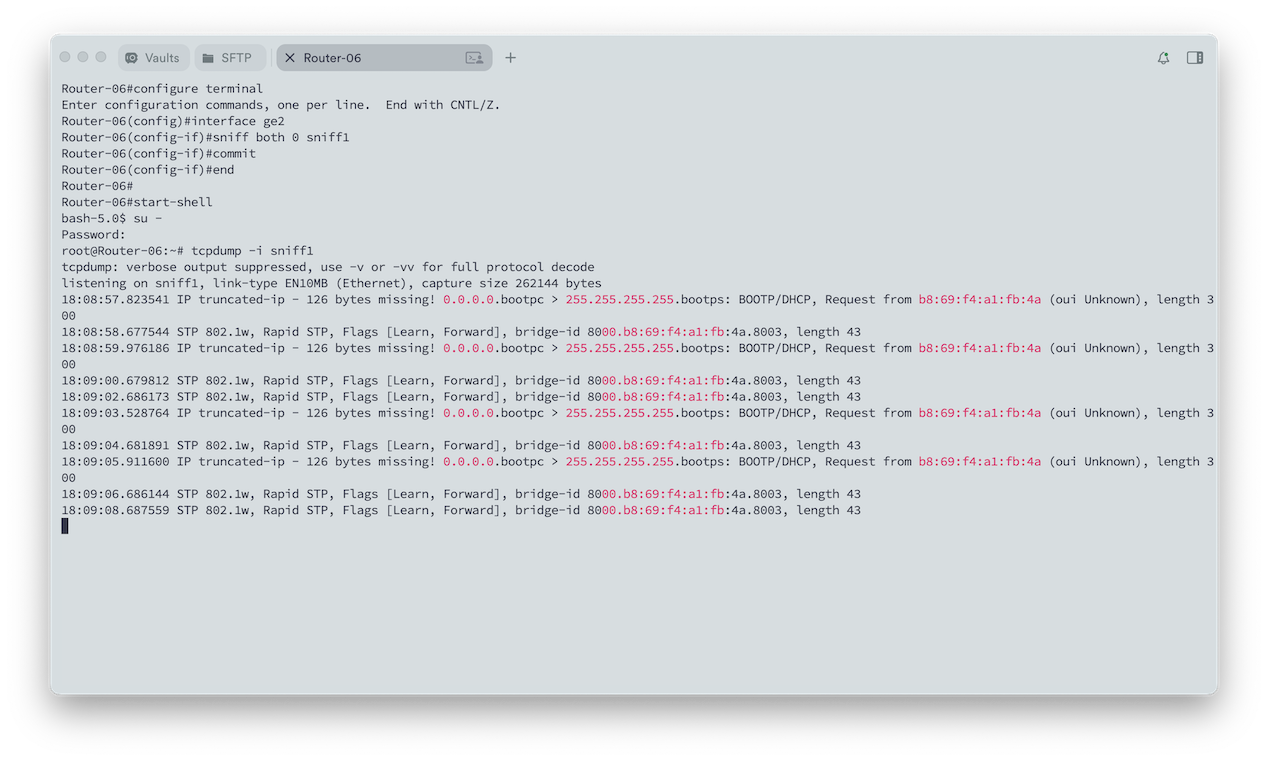
Example:
To capture both ingress and egress traffic on interface ge2 indefinitely:
configure terminal
interface ge2
sniff both 0 sniff1
commit
end
start-shell
su –
<password>
tcpdump -i sniff1