
In this article, we’ll walk through how to configure Port-Channels (Link Aggregation Groups) on Enterprise SONiC. You’ll learn how to:
- Create a Port-Channel
- Add member interfaces
- Configure LACP
- Verify your configuration
Port-Channels let you combine multiple physical links into a single logical interface, giving you higher bandwidth and better resiliency. They’re ideal for connecting servers, uplinking switches to the core, or any scenario where high availability and performance matter.
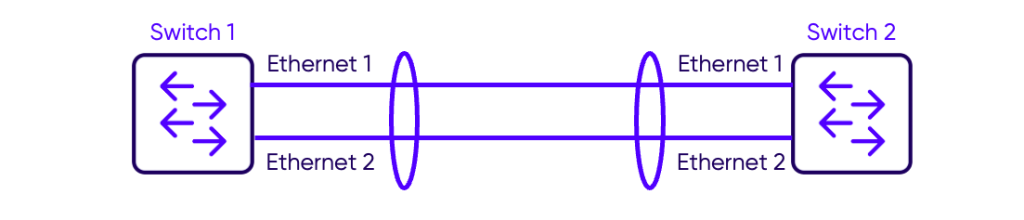
Creating Customer-VLAN and Service-VLAN
A Port-Channel bundles multiple physical interfaces into a single logical interface for redundancy and load balancing.
On Switch-1
Switch-1# configure terminal
Switch-1(config)# interface Port-Channel 1
Switch-1(conf-if)# no shutdown
On Switch-2
Switch-2# Switch-2# configure terminal
Switch-2(config)# interface Port-Channel 1
Switch-2(conf-if)# no shutdown
After creating the Port-Channel 1, we have to add member interfaces to the Port-Channel.
Adding Member Interfaces
Assign physical interfaces to the Port-Channel.
On Switch-1
Switch-1(config)# interface Ethernet 1
Switch-1(conf-if)# channel-group 1
Switch-1(conf-if)# exit
Switch-1(config)# interface Ethernet 2
Switch-1(conf-if)# channel-group 1
On Switch-2
Switch-2(config)# interface Ethernet 1
Switch-2(conf-if)# channel-group 1
Switch-2(conf-if)# exit
Switch-2(config)# interface Ethernet 2
Switch-2(conf-if)# channel-group 1
The command channel-group 1 adds the interface to the Port-Channel 1 and enables LACP.
Verification
Use the command show portchannel summary to verify Port-Channel configuration:
Switch-1# show PortChannel summary
Flags(oper-status):  D - Down U - Up (portchannel) P - Up in portchannel (members) I - LACP individual
----------------------------------------------------------------------------------------------------------------------------
Group               PortChannel                   Type                Protocol          Member Ports
----------------------------------------------------------------------------------------------------------------------------
1                   PortChannel1   (U)            Eth                 LACP              Ethernet1(P)
                                                                                        Ethernet2(P)
We can see that the PortChannel1 is UP and it has 2 members ports: Ethernet1 and Ethernet2. Both port are UP indicated by the (P).
Notes
- Port-Channels improve bandwidth and provide redundancy.
- Ensure both ends (Switch 1 and Switch 2) have consistent configuration.