
In this article we will explore how to configure BGP using unnumbered interfaces on Enterprise SONiC. We will cover:
- BGP unnumbered overview
- Enabling BGP on unnumbered interfaces
- Configuring neighbors with interface references
- Verification
BGP Unnumbered Overview
BGP unnumbered allows routers to establish BGP sessions without assigning an IPv4 address to each point-to-point interface. Instead, it relies on IPv6 link-local addresses and the extended next-hop encoding defined in RFC 5549, which enables IPv4 routes to be advertised with an IPv6 next hop. When IPv6 is enabled on an interface, a link-local address is automatically created and exchanged using IPv6 router advertisements (RAs). BGP peers discover each other by parsing these RAs and use the learned link-local addresses to form BGP sessions over TCP. The primary benefit of this approach is operational simplicity: it eliminates the need to allocate and manage IPv4 addresses on every inter-router link, reduces configuration overhead, and prevents address exhaustion. In large enterprise and data-center networks built on SONiC, BGP unnumbered enables cleaner, more scalable routing designs while maintaining full IPv4 reachability.
Topology
We will use the same topology used in Article 15 – SONiC BGP configuration and we will use BGP unnumbered for eBGP configuration between Switch-3 and Switch-5.
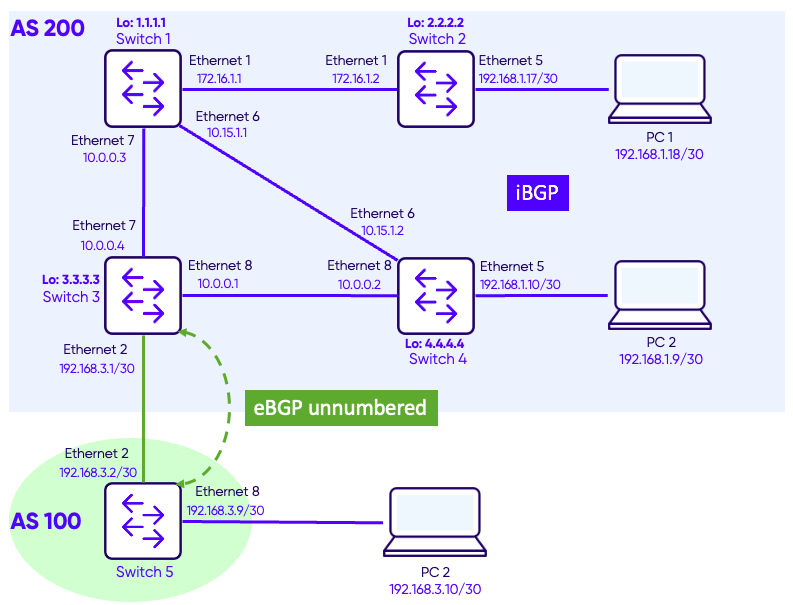
Configuration
We will remove the IP interfaces from the following interface:
- Switch-3 / Ethernet 2
- Switch-5 / Ethernet 2
Switch 3
Switch-3# show running-configuration interface Ethernet 2
!
interface Ethernet2
 mtu 9100
 speed 25000
 unreliable-los auto
 no shutdown
 ip address 192.168.3.1/30


Switch-3# configure terminal
Switch-3(config)# interface Ethernet2
Switch-3(config-if-Ethernet2)# no ip address
Switch-3(config-if-Ethernet2)# ipv6 enable
Switch-3(config-if-Ethernet2)#
Switch 5
Switch-5# show running-configuration interface Ethernet 2
!
interface Ethernet2
 mtu 9100
 speed 25000
 unreliable-los auto
 no shutdown
 ip address 192.168.3.2/30


Switch-5# configure terminal
Switch-5(config)# interface Ethernet2
Switch-5(config-if-Ethernet2)# no ip address
Switch-5(config-if-Ethernet2)# ipv6 enable
Switch-5(config-if-Ethernet2)#
We will change the router BGP configuration to use BPG unnumbered.
Switch 3 – Before
router bgp 200
 router-id 3.3.3.3
 log-neighbor-changes
 timers 60 180
 !
 neighbor 1.1.1.1
  remote-as 200
  update-source interface Loopback 0
  !
  address-family ipv4 unicast
   activate
 !
 neighbor 2.2.2.2
  remote-as 200
  update-source interface Loopback 0
  !
  address-family ipv4 unicast
   activate
 !
 neighbor 4.4.4.4
  remote-as 200
  update-source interface Loopback 0
  !
  address-family ipv4 unicast
   activate
 !
 neighbor 192.168.3.2
  remote-as 100
  !
  address-family ipv4 unicast
   activate
Switch 3 – After
router bgp 200
 router-id 3.3.3.3
 log-neighbor-changes
 timers 60 180
 !
 neighbor 1.1.1.1
  remote-as 200
  update-source interface Loopback 0
  !
  address-family ipv4 unicast
   activate
 !
 neighbor 2.2.2.2
  remote-as 200
  update-source interface Loopback 0
  !
  address-family ipv4 unicast
   activate
 !
 neighbor 4.4.4.4
  remote-as 200
  update-source interface Loopback 0
  !
  address-family ipv4 unicast
   activate
 !
 neighbor interface Ethernet2
  remote-as 100
  capability extended-nexthop
  !
  address-family ipv4 unicast
   activate
We apply similar configuration on Switch-5.
Verification
Use the commandshow bgp ipv4 unicast summary to verify BGP peers.
Switch-5
Switch-5# show bgp ipv4 unicast summary
BGP router identifier 5.5.5.5, local AS number 100 VRF default
Neighbor      V   AS         MsgRcvd   MsgSent   InQ     OutQ    Up/Down         State/PfxRcd
Ethernet2     4   200        9         11        0       0       00:02:54        4

Total number of neighbors 1
Total number of neighbors established 1
Notice that we have BGP neighbor on interface Ethernet 2 in AS 200.
Use the commandshow ip routeto verify the routing table.
Switch-5# show ip route
Codes:  K - kernel route, C - connected, S - static, B - BGP, O - OSPF, A - attached-host
        > - selected route, * - FIB route, q - queued route, r - rejected route, b - backup
       Destination        Gateway                                                                    Dist/Metric   Last Update
--------------------------------------------------------------------------------------------------------------------------------
 B>*   10.0.0.0/28        via fe80::e2d:4aff:fed0:a       Ethernet2                                  20/0          00:05:45 ago
 B>*   172.16.1.0/28      via fe80::e2d:4aff:fed0:a       Ethernet2                                  20/0          00:05:45 ago
 B>*   192.168.1.8/30     via fe80::e2d:4aff:fed0:a       Ethernet2                                  20/0          00:05:45 ago
 B>*   192.168.1.16/30    via fe80::e2d:4aff:fed0:a       Ethernet2                                  20/0          00:05:45 ago
 C>*   192.168.3.8/30     Direct                          Ethernet5                                  0/0           00:14:59 ago
Notice that the BGP-learned routes use IPv6 link-local addresses as next hops (fe80::/10), even though the routes themselves are IPv4. This is a direct result of BGP unnumbered with RFC 5549 extended next-hop encoding, where IPv4 prefixes are resolved over IPv6 link-local next hops on the point-to-point interface.
Notes
- IPv6 is required – BGP unnumbered relies on IPv6 link-local addresses and router advertisements, even when carrying only IPv4 routes.
- Use only on point-to-point links – Shared or multi-access segments can cause ambiguous neighbor discovery and should be avoided.
- Ensure RFC 5549 support end-to-end – All BGP peers must support extended next-hop encoding for IPv4 over IPv6 to work correctly.
- Expect different troubleshooting workflows – There are no IPv4 interface addresses, so debugging relies on IPv6 link-local and BGP-specific tools.